
Most meetings in the real world are not in one language. A family business talks in Gujarati and writes its accounts in English. A housing society meeting in Mumbai moves between Marathi, Hindi and English. A team in Dubai speaks Arabic with the client and English with each other. A supplier call starts in English and slips into Spanish when the numbers come up.
Somebody still has to write the minutes. Usually it is the one person in the room who understands every language, and it takes them an evening.
MeetNotes writes those minutes for you, whatever language the room speaks. You record on your phone. MeetNotes writes down every word as it was said, in the language and script it was said in, and then writes the minutes (summary, decisions, action items) in the language your readers need.
Who this is for
Minutes are not only for company board rooms. Anyone who has to tell other people what was said can use them:
- Business owners who meet suppliers, dealers and staff in two or three languages.
- Society secretaries and committee members who must circulate minutes of every meeting.
- Teachers and principals after parent meetings, where parents speak their own language.
- Doctors whose patients describe their problem in their mother tongue. See consultation notes for doctors.
- NGO and field teams who meet communities in the local language and report in English.
- Students whose lectures switch language, and anyone with a recording they cannot follow. See translate audio to English.
How MeetNotes handles languages
1. There is no language to choose before you record
You press record and talk. MeetNotes works out the language on its own, including when people change language halfway through a sentence. This matters more than it sounds: a tool that makes you pick one language first has nowhere to put the second one.
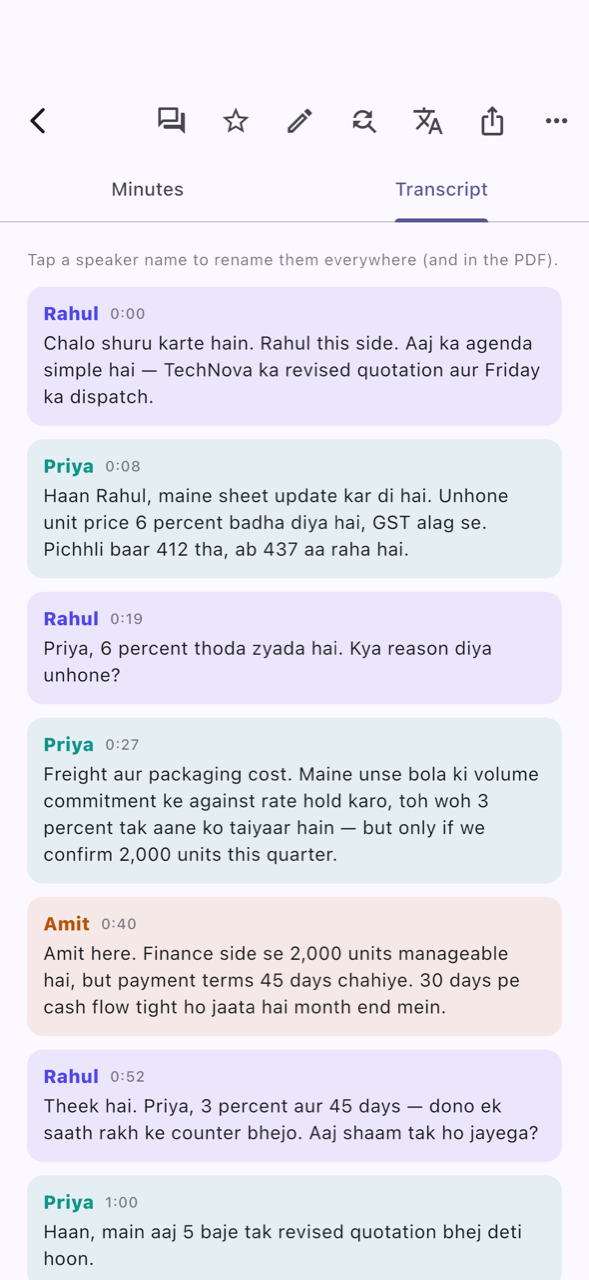
2. The transcript is written as it was spoken
A Hindi sentence stays Hindi. An English sentence stays English. When someone says "Haan, quotation kal tak bhej dena", that is exactly what you read. Each line shows who spoke and when.
The transcript keeps each language in its own script: Devanagari, Gujarati, Arabic, Latin and others.
3. The minutes come in the language your readers need
The people who read the minutes are often not the people who spoke. The partners read English. The accountant reads Gujarati. The parents read Hindi.
So the minutes are written in the language you choose, not the language spoken most. Set it once in Settings → Minutes language, and MeetNotes can also ask you each time you stop a recording. There are 110 languages to choose from, including Hindi or Gujarati written in English letters ("Jaise humne kaha tha"), which is how many people actually read and type on WhatsApp.
The minutes language covers the summary, key points, decisions and to-dos. The transcript keeps its own language, so nothing that was said is lost in translation.
4. Read any meeting in another language
Already have the minutes in English, and a colleague wants them in Arabic? Open the meeting, tap the menu and choose View in another language. The notes and the transcript lines switch to that language, and Original brings back exactly what was said. More on this in translate audio to English or any language.
5. Names and terms spelled right
Names are the hardest part of any multilingual meeting: a person's name, a product, a place. When MeetNotes is not sure of a name, it asks you to check it. If a name was misheard, Fix a misheard term corrects it everywhere (summary, to-dos, transcript and PDF) and remembers it for future meetings. Your corrections are kept in Settings → Names & terms we should get right, where you can also add your clients, products and staff names yourself.
The audio and the words stay in step, in every language
A transcript is only useful if you can trust it, and the easiest way to trust it is to hear it. In MeetNotes the transcript and the recording move together: tap any line and the recording plays from exactly that line, with each word lighting up as it is spoken.
This works the same in Hindi, Gujarati, Arabic, Spanish or English, and in lines that switch between them. So when you want to check a number, a name or a promise before you send the minutes, you tap the line and hear it in a few seconds. The full story is in transcript synced with audio.
Getting the minutes to everyone who needs them
Once the minutes are ready, open the meeting and tap share:
- Share on WhatsApp (text): the minutes as a message, for a group or a person.
- Share minutes (PDF): a clean document to circulate or print.
- Share minutes (Word): if you want to edit the wording before sending.
- Email minutes to attendees: the recap and PDF to the people in the meeting.
The people who receive the minutes do not need MeetNotes.
A simple routine that works in any language
- Put the phone on the table in the middle of the room, and press record. Ask people to speak one at a time when a decision is being made.
- Say the important things clearly ("So we agree, delivery on the 20th"). This helps any notes, human or app.
- When it ends, pick the minutes language for the people who will read them.
- Check two or three lines (the numbers and the decisions) by tapping them and listening.
- Share on WhatsApp, as a PDF, or by email.
If you want to write mixed-language minutes by hand, how to write minutes when the meeting switches language has a template. For Hindi in particular, see Hindi and Hinglish transcription, and for Gujarati, Gujarati meeting transcription. The full list is on the languages page.
New to MeetNotes? You can watch the full film with sound (53 s) to see a meeting being recorded and the minutes being written.
FAQ
Can MeetNotes transcribe a meeting where people mix languages?
Yes. There is no language to choose. A meeting that switches between Hindi and English, or Arabic and English, or any other mix, is written down as it was spoken, with each speaker labelled.
Can I get the minutes in a different language from the one spoken?
Yes. Choose the minutes language in Settings → Minutes language, or when you stop a recording. The summary, decisions and to-dos are written in that language, and the transcript stays in the language it was spoken in.
How many languages does MeetNotes support?
The minutes can be written in any of 110 languages, including Hindi or Gujarati in English letters. The full list is on the languages page.
Can I read an old meeting in another language?
Yes. Open the meeting, tap the menu and choose View in another language. Choose Original to go back to exactly what was said.
Does the audio stay in sync with the transcript in Hindi or Arabic?
Yes. Tap any line of the transcript and the recording plays from that line, with each word highlighted as it is spoken, in any language or script.

